ShortcutCAD: Learn 2D CAD at Your Pace (Includes 3D Basics)
Lifetime access to the ShortcutCAD Online Course.
ShortcutCAD is designed to fit real life. Each lesson is short, focused, and easy to return to whenever you need a refresher—whether you’re learning CAD for the first time or just need help with a specific task.
The course includes 79 bite-size lessons across 15 modules, with most lessons running 10–15 minutes each. You can move through the course from start to finish at a comfortable pace, jump directly to the topics you need, or even complete the entire course as a weekend crash course—it’s completely up to you.
All lessons are taught using a real pump house project, taking you from a blank drawing to a finished, plotted set—so everything stays practical and grounded in real drafting workflows.
Whether you have time to focus deeply or only 15 minutes here and there, ShortcutCAD is built so you can pick it up exactly where you left off—without needing to rewatch hours of content.
What users say …
Many thanks again. Your support is the best I’ve received. I hope your other customers feel the same as I do.
Philip VentonVenton & Assoc.com
I have to say your tutorials and guidance are very professional and proficient. They are very easy to understand without long and tedious explanations. Simple and straightforward.
Lewis CooperC & C Construction and Consulting
Your support is the best. It gives me confidence to use my CAD! In all the years and thousands of dollars, I’ve never had this kind of response from AutoCAD. Dan McNeill
McNeill Associates
I cannot tell how much I appreciate the support you have given me. It has been well worth the money I spent on it.
Mark CrosbyGaumer Co. Inc.
Never got that kind of service from any software company. Keep up the good work, you are awesome.
Ludek Cerny,CompaMTH Industries
I have sold, trained and used CAD for over 50 years. Started with Intergraph who sold MicroStation then Autocad, Dassault etc. I am quite impressed.
John MurrayJW Murray Corp.
I have been working with these guys since years now! With lots of hard work and timely communication they made sure they delivered the best to me. Highly recommended!
John Furgurson BN Branding
It does not matter what industry you are in as the examples and methods you will learn can be applied to any type of project.
What we’ll be covering
79 focused lessons across 15 modules
ShortcutCAD is built around a real pump house project, taught step-by-step in short, practical lessons. Each module is broken into 5–15 minute work sessions, making it easy to learn CAD without overwhelm.
Most modules run 30–45 minutes total, and each one builds directly on the last.
Module 0 — Welcome & Course Setup (3 lessons)
Get oriented and ready to work. You’ll review the course roadmap, CAD requirements, and how the class is structured. We’ll also introduce the pump house and wall detail project you’ll be drawing throughout the course, plus basic mouse and keyboard habits to set you up for success.
Module 1 — Creating a Simple CAD Workspace (8 lessons)
Learn how to declutter and simplify your CAD workspace for speed and clarity. This module covers workspace setup, metric vs imperial units, Cartesian coordinates and UCS, dynamic input, grid snaps, file organization, and essential panning and zooming skills.
Module 2 — Basic Drawing Input & Snaps (8 lessons)
Start drawing using real examples. You’ll practice rectangle input, arcs, trimming, snap workflows, spacebar commands, layer basics, hatching, and reinforcing dynamic input—using a wall detail to keep everything practical.
Module 3 — Scale, Styles & Annotations (5 lessons)
Understand how scale really works in CAD and why it matters. You’ll use a scaling cheatsheet, create text, dimension, and multileader styles, and learn how to add annotations correctly so drawings stay readable and consistent.
Module 4 — Advanced Snaps & Linetypes (5 lessons)
Increase accuracy and speed with transparent snap commands and object snap tracking. This module also expands on linetypes, including annotative linetypes, and applies them while continuing the wall and plan work.
Module 5 — Paperspace & Title Blocks (5 lessons)
Learn how to present drawings professionally. You’ll cover Paperspace fundamentals, page setup, title blocks, MTEXT for titles and logos, and dynamic fields with print preview to keep drawings up to date automatically.
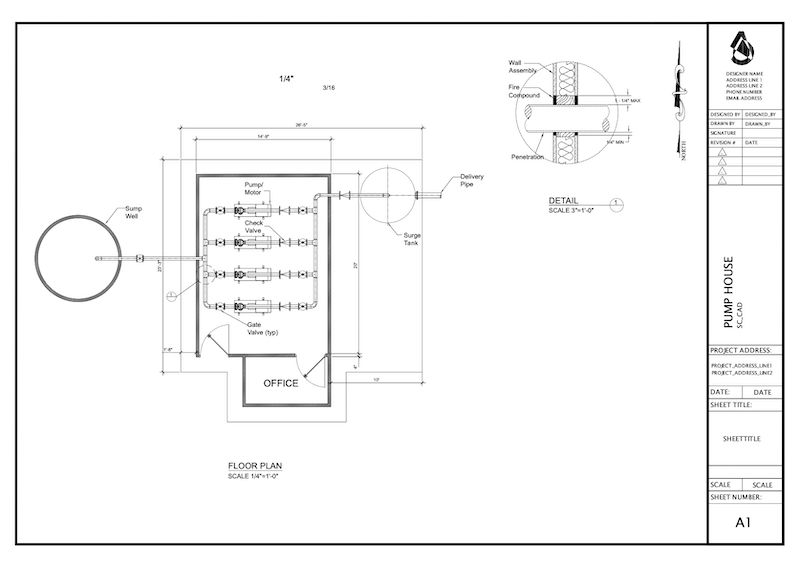
We draw a pump house (above)
Module 6 — Blocks & Reusable Content (5 lessons)
Discover how blocks can dramatically speed up your workflow. You’ll learn what blocks are, how to manage them with Block Explorer, use external blocks, and insert blocks efficiently for reuse in real projects.
Module 7 — Isometrics & Mech-Q Introduction (5 lessons)
Get introduced to isometric workflows and mechanical drafting concepts. You’ll create simple ISO sketches, build fittings using Mech-Q (optional), and generate ISO BOMs and annotations—bridging CAD fundamentals with production drafting.
Module 8 — Dimensioning & Viewports (5 lessons)
Focus on dimensioning drawings clearly and correctly. You’ll learn dimensioning workflows, adjusting viewports, and using dimension overrides to ensure drawings plot properly and communicate intent.
Module 9 — Practice & Annotation Workflows (4 lessons)
Apply what you’ve learned through hands-on practice. You’ll work with pipe input using copy, move, and mirror, speed up annotation using ADDSELECTED, and refine drawings with hatch and match tools.
Module 10 — Xrefs, Layouts & Tool Palettes (5 lessons)
Learn how to manage larger, more complex drawings. This module covers external references (Xrefs), copying layouts, viewport layer and color overrides, symbols, tool palettes, and practical layer state workflows.
Module 11 — Templates & Annotative Styles (7 lessons)
Standardize your drawings and save time. You’ll build and use DWT templates, handle metric-to-imperial scaling, create drawing sheet templates, master annotative styles, and understand when not to dimension in Paperspace.
Module 12 — Tables, Plotting & Automation (7 lessons)
Learn to manage data and output efficiently. Topics include tables and general notes, filters, plotting, batch publishing, print style tables, and command references including aliases, scripts, and basic LISP concepts.
Bonus Modules
Module 13 — Introduction to 3D (6 lessons)
Explore 3D without getting overwhelmed. You’ll work with 3D coordinates, Rotate3D, extrude, subtract, sweep, and create a simple 3D roof by converting the pump house from 2D to 3D.
Module 14 — Recovery & Backups (1 lesson)
Learn how to protect your work. You’ll understand recovery settings, autosaves, backups, and how to safely recover files after crashes or share them using cloud tools.
Is Shortcut CAD for me?
This course is for you if …
• You’re just starting CAD without any experience.mentorship experience as possible
• You’re completely overwhelmed with all there is to learn.
• You’ve got some CAD background but still struggle to draw.
• You’re seeking to become a CAD consultant and make more money at CAD
• You’re too busy and can’t find time to learn CAD..
• You want to improve your drawing speed.
• You’re needing to transition from hand drawing to CAD painlessly.
• You’re looking for a class with both support and mentorship included.
The risk is on me!
Again this is a zero risk purchase—the risk is on me! I want you to be over-the-moon delighted with Shortcut CAD. However, if within the first 2 weeks you’re not entirely satisfied with the content and direction of the course, please contact me or a full refund. No questions asked.
Please note: this is a presale so you’re pre-ordering the course. You’ll get instant access to over 4 hours of learning. I’ll be releasing the remaining modules during Sept-Oct 2022. Each module is about 30-45 min of teaching broken up into short 10-15 min work sessions. This presale opportunity will also allow you to give feedback and share your struggles. It will also allow me to cover topics you may be stumbling on with greater detail. If within 2 weeks or before I release Module 3 and you decide the course isn’t for you, I’ll gladly refund your purchase.
Who is this anyway?

Hi, I’m Erik Z and I love to help CAD users like you become highly skilled at CAD and create drawings with minimal stress and effort.
I was once like you, when I first started CAD over 25 years ago, I went from pencil drafting into a CAD operator working for a structural engineering office. I too struggled to take myself to the next level. Using my shortcut methods I can draw up sheet sets in days instead of weeks and I’m ready and raring to help you achieve this too!
Got A Question?
Here are the answers to some of the most commonly asked questions.
• Do you offer direct support? One of the big advantages you will have while taking this course is CAD mentorship. You can contact me directly through the Community which you take the course and I will always normally get back with you within a day.
• What’s required? You’ll need a 2D AutoCAD-Like application. If you don’t have one I can provide a 2D/3D CAD (called AViCAD) for 30 days while you get started on the course. Additional cost after this period is $49/mo. and you can cancel anytime. Note: Only the 3D bonus module will require 2D and 3D CAD functionality.
• Is this class just for beginners? It’s for those just starting CAD, but also for those who may have a background and are struggling with their productivity will also benefit from this course.
• Will metric users benefit from this course? Yes, even if you are using metric units, you can apply the same concepts and shortcuts you will learn from this course. As you work though examples you’ll just need to apply metric values. I’ll also provide a metric title block if needed.
• I have a Mac. Will this be a problem? If you already have AutoCAD for the Mac, then you are all set to go. If you don’t have CAD, then you’ll need Parallels to run our Windows based AutoCAD-Like product called AViCAD.
If you have a different question, just contact me here and I’ll get that answered.
The program supports DXF and is compatible with most CNC applications. You don’t need CAD software to run this program, as it can work independently.
ShortcutCAD
Learn at your own pace. Rewatch anytime. Use it as CAD reference help for years to come
Shortcut CAD is an online course that simplifies the CAD learning process by breaking down complex topics into manageable lessons. The course includes over 9 hours of training and offers lifetime access to the materials