
Built-In AEC Tools for Professional CAD Projects
AViCAD includes a complete set of AEC and architectural CAD tools designed for architects, designers, and construction professionals who need DWG-compatible workflows without the cost or complexity of traditional AutoCAD® AEC products.
These tools are built directly into AViCAD—no add-ons required—making it easy to create, edit, and collaborate on architectural and construction drawings using a familiar CAD environment.
AEC CAD Tools Designed for Architecture & Construction
AViCAD’s AEC tools support common architectural and construction workflows while remaining fully compatible with AutoCAD® AEC objects. This allows teams to work efficiently across firms, consultants, and clients without file conversion or workflow disruption.
Key capabilities include:
- 2D and 3D architectural drafting
- Parametric building elements
- Style-based object control
- Native DWG compatibility
Native DWG compatibility
3D Architectural Module
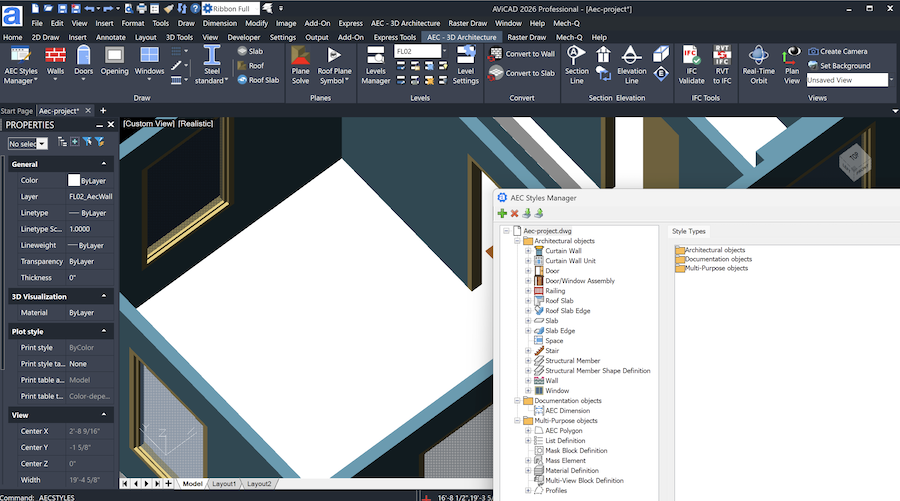
AViCAD includes a robust 3D architectural module that allows users to create and modify building elements directly in 3D while maintaining clean 2D documentation.
You can easily create:
- Walls and curtain walls
- Doors and windows
- Stairs and railings
- Architectural layouts with consistent styles
These tools help streamline both conceptual design and detailed documentation without requiring BIM-only workflows.
AEC Styles Manager & AutoCAD AEC Compatibility
The AEC Styles Manager allows you to control how architectural objects behave, display, and update throughout a project. Styles can be customized to match office standards and reused across drawings for consistency.
AViCAD can open and work with drawings that contain AutoCAD AEC objects, allowing files to move smoothly between AViCAD and AutoCAD-based AEC environments. This makes collaboration with consultants or clients using AutoCAD Architecture straightforward, while preserving drawing integrity.
AViCAD continues to evolve with regular updates and performance improvements, ensuring architects and AEC professionals always have access to modern, reliable CAD tools without forced subscriptions.
Next, AViCAD DWG + Exporting and Importing
View Next Slide
Or get started now and try AViCAD now
 Check out our affordable AViCAD prices here!