
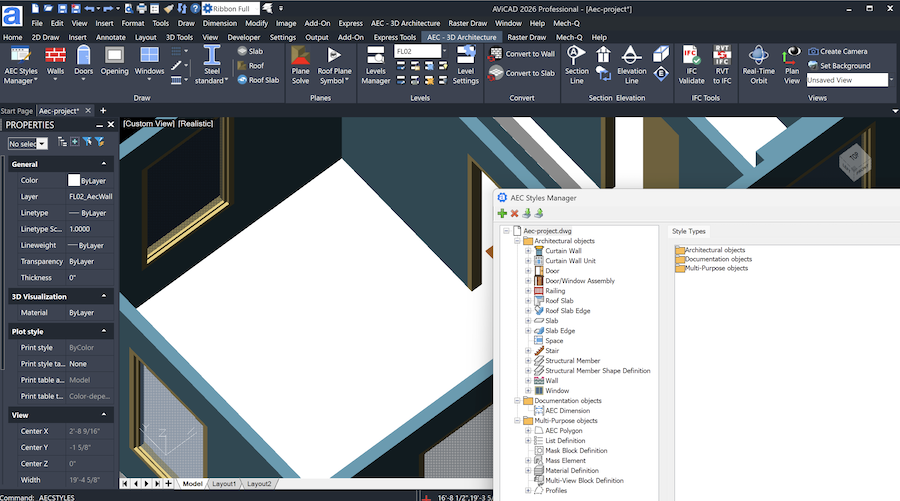
AViCAD AEC Tools – Built-In Architectural CAD Tools
AViCAD includes a complete set of AEC and architectural CAD tools designed for architects, designers, and construction professionals who need reliable DWG-based workflows inside a familiar CAD environment.
These AEC tools are built directly into AViCAD — no separate add-ons, installers, or configuration steps are required. Once AViCAD is installed, the AEC tools are immediately available and ready to use within the same interface you already know.
Architectural CAD Tools for Everyday Drawing Tasks
AViCAD’s AEC tools support common architectural and construction drafting needs while remaining fully compatible with AutoCAD® AEC objects and DWG files. This makes it easy to collaborate with consultants, engineers, and clients using AutoCAD-based workflows.
Key capabilities include:
- 2D and 3D architectural drafting
- Parametric architectural objects
- Style-based object control
- Native DWG compatibility
Because AViCAD works directly with DWG files, drawings can be shared, reviewed, and edited without conversion or loss of data.
See how AViCAD fits into existing AutoCAD® workflows.
3D Architectural Module
AViCAD includes a dedicated 3D Architectural module that allows you to create and modify building elements in 3D while maintaining clean, accurate 2D documentation.
You can easily draw and manage:
- Walls and curtain walls
- Doors and windows
- Stairs and railings
- Architectural layouts using consistent styles
These tools support both conceptual design and detailed drafting, allowing you to work efficiently while keeping drawings organized and readable.
AEC Styles Manager & AutoCAD AEC Compatibility
The AEC Styles Manager allows you to control how architectural objects display and behave throughout a project. Styles can be customized to match office standards and reused across drawings to maintain consistency.
AViCAD can open and work with drawings that contain AutoCAD AEC objects, allowing files to move smoothly between AViCAD and AutoCAD-based AEC environments. This makes coordination with external teams straightforward while preserving drawing integrity.
View supported DWG formats and file compatibility
Integrated Tools — No Separate Setup Required
All AEC tools are included in AViCAD’s core installation. There is no separate AEC package to install, license, or maintain.
The tools integrate directly into AViCAD’s workspace, and users can choose between:
- A ribbon-based interface
- A classic pull-down and toolbar layout
This flexibility allows teams to work the way they prefer while using the same underlying tools.
Next, AViCAD DWG compatibility, importing, and exporting.
AViCAD DWG compatibility
Or get started now and try AViCAD now
 AViCAD 2027 is now available. Explore new features including faster performance, drawing comparison tools, enhanced GIS capabilities, improved Visual LISP support, and more. See what's new in AViCAD 2027.