
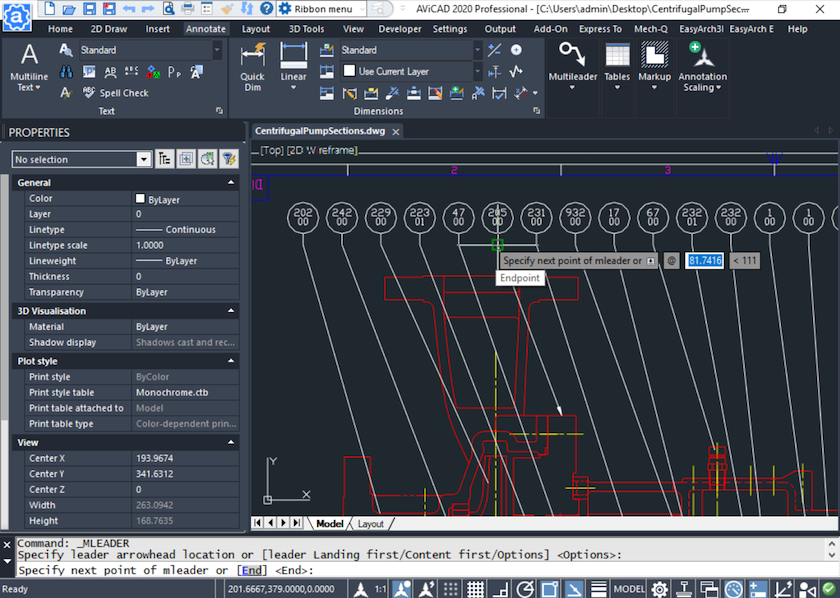
AViCAD: A Familiar, AutoCAD-Like Interface
If you’ve worked in AutoCAD® or AutoCAD LT®, you’ll feel at home almost immediately in AViCAD. The screen layout, tools, and command structure are intentionally familiar, so you can focus on drawing — not relearning software.
Even if you’re a little rusty with CAD, AViCAD makes it easy to get back up to speed. The interface is clean, logical, and designed to help you complete drawings faster and with less friction.
Ribbon Interface – Familiar and Discoverable
AViCAD includes a modern Ribbon interface that closely follows what AutoCAD users expect.
Tools are organized by task — drawing, modifying, annotation, layers, blocks, and more — making it easy to find commands visually when needed. This is especially helpful when learning new tools or revisiting commands you don’t use every day.
For many users, the Ribbon provides a comfortable balance between power and discoverability. We invite you to compare AViCAD to AutoCAD® workflows.
Classic Interface – Clean and Minimal
For users who prefer a more focused workspace, AViCAD also offers a Classic interface.
This layout minimizes screen clutter and emphasizes:
- Menus
- Toolbars
- Command line input
It’s ideal for experienced CAD users who rely on keyboard input and want maximum drawing area with minimal distractions.
You can switch between interface styles to match how you prefer to work.
Properties Palette – Edit Without Interrupting Your Flow
The Properties palette lets you view and modify object settings instantly.
Select any object and adjust:
- Layer
- Color
- Linetype
- Lineweight
- Dimensions and properties specific to the object type
This allows you to make precise changes without repeatedly opening dialog boxes or reissuing commands — keeping your workflow fast and uninterrupted.
Tool Palettes – Reuse What You Draw Most
Tool Palettes give you quick access to frequently used content.
You can store:
- Blocks
- Hatches
- Dimensions
- Styles
- Custom tools
This makes it easy to reuse standardized content and maintain consistency across drawings, especially in production environments.
Command Line – Just Like You’re Used To
At the heart of AViCAD is a familiar command-line interface.
You can type commands exactly as you would in AutoCAD, including:
- Standard command names
- Short command aliases
- Keyboard-driven workflows
If you’re used to typing commands instead of clicking icons, AViCAD works exactly the way you expect.
Aliases and Commands – No Relearning Required
AViCAD supports AutoCAD-style commands and aliases, so muscle memory carries over.
Common commands, shortcuts, and workflows behave the same, meaning:
- Minimal retraining
- Faster onboarding
- Immediate productivity
You don’t have to adapt your habits to the software — the software adapts to how you already work.
Designed to Get You Productive Quickly
AViCAD isn’t about forcing a new way of working. It’s about providing a familiar CAD environment with powerful CAD engineering tools that help you finish drawings efficiently.
Whether you prefer a ribbon-driven interface, a minimal classic workspace, or a command-heavy workflow, AViCAD gives you the flexibility to work the way you’re most comfortable.
Next, explore our Mech-Q suite of tools
What's inside Mech-Q?
Or get started now and try AViCAD now
 AViCAD 2027 is now available. Explore new features including faster performance, drawing comparison tools, enhanced GIS capabilities, improved Visual LISP support, and more. See what's new in AViCAD 2027.