
Over 10,000 CAD Blocks Included Free
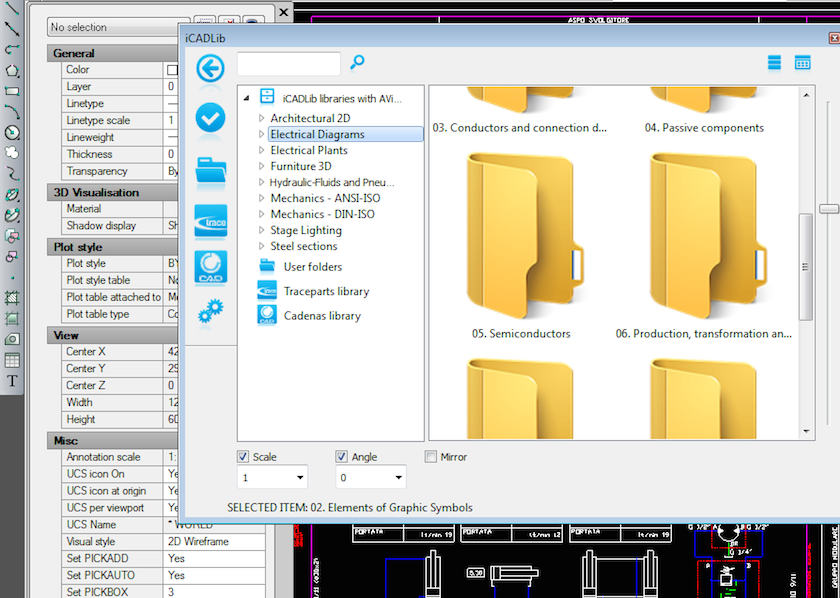
A powerful symbol and block library built right into AViCAD
Blocks are one of the most important productivity tools in CAD. They allow you to reuse drawings that have already been created—symbols, parts, components, and details—so you’re not redrawing the same objects over and over again.
AViCAD includes a large built-in block and symbol library with over 10,000 ready-to-use 2D and 3D blocks, available immediately after installation. No downloads, no subscriptions, and no separate block manager to install.
Whether you’re producing architectural plans, electrical diagrams, mechanical layouts, or fabrication drawings, the block tools in AViCAD help you work faster while maintaining consistency across drawings.
What Are Blocks — and Why They Matter
For users new to CAD, a block is a reusable drawing object. Instead of drawing the same valve, symbol, fixture, or component repeatedly, you insert a block that’s already been created and standardized.
Using blocks helps you:
- Reduce drawing time
- Maintain consistent symbols and details
- Update repeated elements easily
- Keep drawings smaller and more organized
For experienced users, blocks are essential for maintaining office standards and speeding up production work.
A Library That Covers Multiple Disciplines
AViCAD’s built-in block library includes organized categories such as:
- Architectural 2D symbols
- Electrical diagrams
- Electrical plant layouts
- Hydraulic fluids and pneumatics
- Mechanical components (ANSI / ISO / DIN)
- Steel sections and profiles
- Stage lighting symbols
- Furniture (2D and 3D)
Blocks are grouped logically so you can browse quickly, insert what you need, and keep working without breaking your workflow.
In addition to the built-in library, AViCAD also supports online and external block libraries, giving you even more ways to find and reuse content from existing projects or third-party sources.
Use Your Own Blocks — and Existing Libraries
AViCAD isn’t limited to the included blocks.
You can:
- Import your existing block libraries
- Edit and reuse blocks from older drawings
- Even read and modify existing Dynamic Blocks
- Save frequently used blocks into organized folders
AViCAD also includes block management tools that make it easy to store, organize, and retrieve blocks by category—ideal for offices that rely on repeatable details and symbols.
Fully Integrated with 2D, 3D, and Mech-Q Tools
Blocks in AViCAD behave like true CAD objects. They work seamlessly with:
- 2D and 3D drawing tools
- Mech-Q engineering utilities
- AEC and architectural tools
This means blocks can participate in snapping, editing, scaling, rotation, and layer control just like native geometry—without conversion or special handling.
If you’re transitioning into 3D, AViCAD’s block tools help bridge the gap by letting you mix 2D symbols and 3D components in the same environment.
Designed for Productivity — Not Add-Ons
Many CAD platforms charge extra for block libraries or restrict access behind subscriptions. AViCAD takes a different approach: the tools you need are included, so you can focus on producing drawings instead of managing add-ons.
If you want to explore how blocks work alongside AViCAD’s broader toolset, see:
Next, have a look at our AViCAD Explorer
The AViCAD Explorer
Or get started now and try AViCAD now
 AViCAD 2027 is now available. Explore new features including faster performance, drawing comparison tools, enhanced GIS capabilities, improved Visual LISP support, and more. See what's new in AViCAD 2027.