
Share 2D and Interactive 3D PDFs
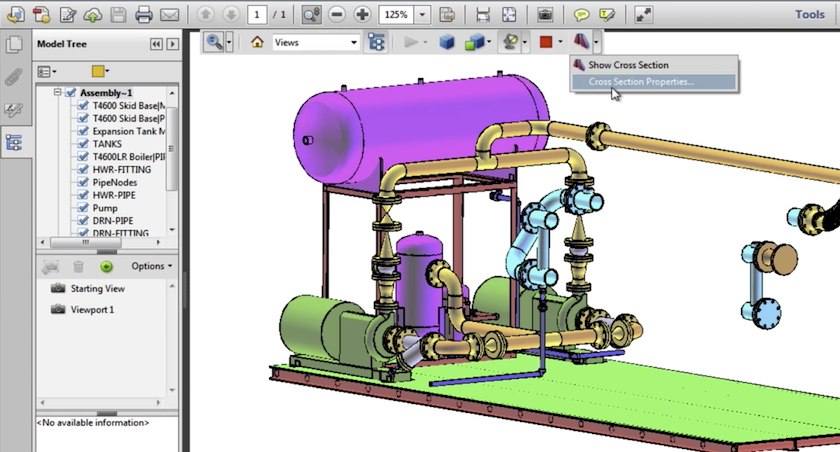
Interactive 3D PDF tool for your clients
AViCAD includes a built-in 3D PDF Export tool that lets you share fully interactive 3D models in a format nearly everyone can open: PDF.
Instead of sending static screenshots or asking clients to install CAD software, you can publish your 3D model directly into a PDF file. Clients can open the file using the free Adobe Reader and immediately interact with the design.
Within the 3D PDF, viewers can:
- Rotate, pan, and zoom the model from any angle
- Switch between shaded, wireframe, and rendered display modes
- Turn layers on and off to isolate parts of the design
- Use predefined views for quick orientation
- Add comments and markups directly to 3D views
This makes 3D PDFs ideal for design reviews, client presentations, approvals, and coordination, especially when working with non-CAD users.
No CAD software is required to view or interact with the model.
Why 3D PDFs Improve Collaboration
Traditional PDFs flatten 3D designs into fixed views.
3D PDFs preserve spatial context, allowing reviewers to explore the model naturally.
This helps:
- Improve client understanding of complex geometry
- Reduce back-and-forth clarification during reviews
- Speed up approvals and decision-making
- Minimize misinterpretation of 3D intent
For many teams, 3D PDFs become the preferred format for client-facing communication.
How the 3D PDF Works
AViCAD embeds true interactive 3D geometry directly inside a standard PDF file. The model remains lightweight, portable, and fully interactive when opened in Adobe Reader.
Because the 3D data is embedded—not flattened—users can interact with the model in real time without plug-ins or special viewers.
Creating a 3D PDF in AViCAD (Quick Overview)
- Prepare your 3D model
Set layers, visibility states, and views as needed. - Choose 3D PDF Export
Select the 3D PDF option from AViCAD’s export tools. - Adjust export settings
Control shading, lighting, background, and layer behavior. - Generate the PDF
AViCAD creates a shareable PDF with embedded 3D content. - Send to clients
Recipients open the file instantly using free Adobe Reader.
No additional software or setup is required on the client’s side.
A Simple Way to Share Complex Designs
3D PDFs allow you to present complex 3D designs in a familiar, easy-to-use format. Clients see more, understand more, and respond faster—without needing CAD experience.
Next, choose a plan and get started today
Get Started
Or get started now and try AViCAD now
 AViCAD 2027 is now available. Explore new features including faster performance, drawing comparison tools, enhanced GIS capabilities, improved Visual LISP support, and more. See what's new in AViCAD 2027.