
Mech-Q Engineering Tools — Built In, Ready to Use
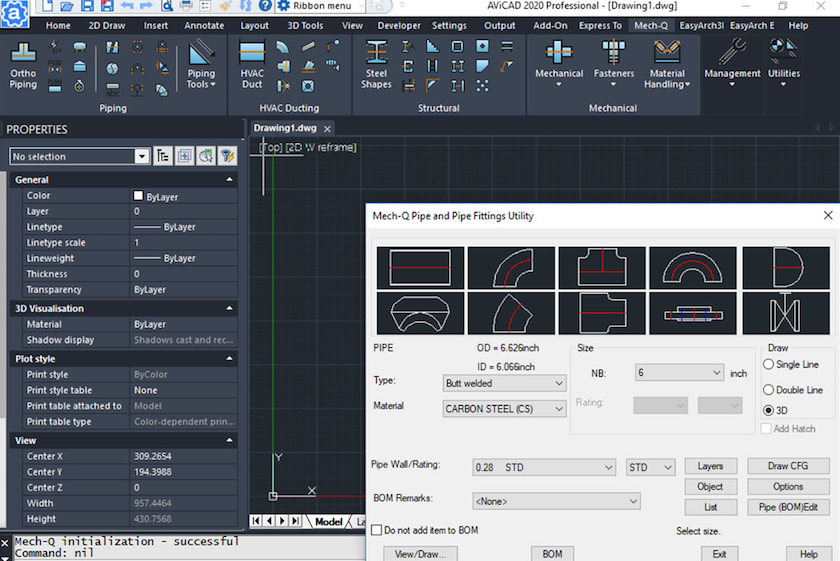
AViCAD isn’t just a drafting tool. Included with every copy of AViCAD is the Mech-Q Engineering Suite, fully integrated into the software from the moment you install it.
There is no separate add-on, no additional installer, and no setup required. Mech-Q tools are available immediately — ready to use inside the same CAD environment you already work in.
Integrated — Not Bolted On
Mech-Q is not a plug-in or external application. The tools are built directly into AViCAD, appearing in menus, toolbars, and workspaces alongside standard CAD commands.
You can choose how Mech-Q is presented based on how you prefer to work:
- Ribbon-based interface — ideal for users who prefer visual discovery and task-based tools
- Classic pull-down menus and toolbars — ideal for experienced CAD users who want a clean, efficient workspace
Mech-Q adapts to your CAD workspace, not the other way around.
One CAD Platform — Multiple Engineering Disciplines
The Mech-Q Suite expands the AViCAD platform to support a wide range of engineering and production workflows, including:
- Mechanical components and layouts
- Piping systems and isometric drawings
- HVAC ducting design
- Structural steel detailing
Wherever possible, Mech-Q works with standard CAD entities, keeping drawings clean, shareable, and fully compatible with typical DWG workflows.
Built-In Value Without Add-On Costs
Many CAD systems charge separately for engineering modules or require complex configuration. AViCAD includes Mech-Q as part of the core product, giving you engineering capability without stacking licenses or subscriptions.
You install AViCAD once — and the tools are already there.
Want a Full Walkthrough?
This page explains what’s included at a high level. For detailed examples, demonstrations, and real workflows, explore the full Mech-Q Tour.
Next, explore AViCAD’s AEC tools
AEC Tools Also Included
Or get started now and try AViCAD now
 AViCAD 2027 is now available. Explore new features including faster performance, drawing comparison tools, enhanced GIS capabilities, improved Visual LISP support, and more. See what's new in AViCAD 2027.