
Sheet Sets & Batch Plotting
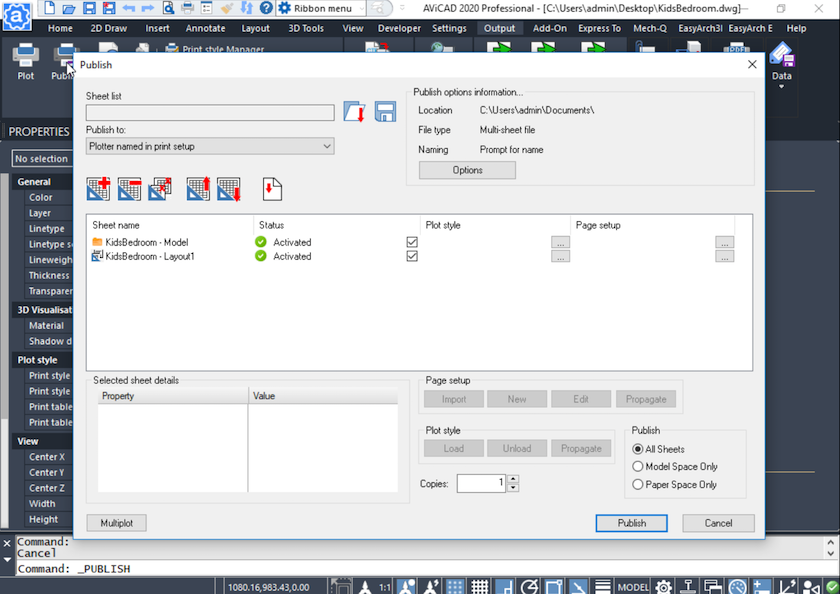
Sheet Sets: Centralized Control for Drawing Packages
AViCAD supports AutoCAD-style Sheet Sets using the same structure, commands, and behaviors CAD users already know. You can start small—using Sheet Sets simply as a centralized way to open and plot drawings—then expand into more advanced features as your workflow evolves.
But what exactly are Sheet Sets, and why should you use them?
At a basic level, a Sheet Set is a project file that organizes drawing layouts into a single, manageable list. Instead of navigating folders full of DWG files, Sheet Sets give you one place to open sheets, manage plotting, and publish complete drawing packages.
Why Sheet Sets Matter
For many users, the challenge isn’t creating drawings—it’s managing them.
Imagine a project folder with dozens of DWG files. You need to publish a full PDF set for review, send updated drawings to a client, or issue final plots. Without Sheet Sets, that usually means opening files one by one and plotting repeatedly.
With Sheet Sets, publishing becomes a single operation.
You define how drawings should plot—paper size, orientation, scale, output type—once. From there, you can publish the entire set to PDF in one command, whether plotting from layouts or model space, depending on how your drawings are structured.
This approach helps ensure consistency across sheets and reduces time spent on repetitive plotting tasks.
Built for AEC, Engineering, and Small Firms
Sheet Sets are especially valuable for:
- AEC teams issuing check sets, permit drawings, and construction documents
- Engineers managing revisions, client deliverables, and final issue packages
- Small firms that need professional output without enterprise CAD overhead
AViCAD includes these capabilities as part of its core CAD platform—no additional installs, add-ons, or configuration required. The commands, dialogs, and workflows behave the same way users expect, making it easy to adopt without retraining.
Because AViCAD is built around native DWG workflows, Sheet Sets work seamlessly alongside existing drawings and file structures. This makes AViCAD a practical and affordable AutoCAD® alternative for teams that need proven project controls without long-term licensing commitments.
Learn more about how AViCAD integrates into common CAD workflows.
Start Simple, Grow Over Time
Many users begin by using Sheet Sets only for:
- Opening drawings from a centralized list
- Publishing multiple PDFs at once
As confidence grows, additional features can be layered in—such as standardized page setups, batch publishing, and transmittal-ready output.
Because the structure is familiar, you’re never forced to change how you draw—only how you manage and deliver drawings.
Part of a Complete CAD Platform
Sheet Sets are one part of AViCAD’s broader focus on productivity, file compatibility, and cost-effective CAD workflows.
You can explore related capabilities here:
- True DWG compatibility
- Why affordable CAD doesn’t mean skimping on tools
- See AViCAD pricing and license options:
Lastly, have a look at our 3D (and 2D) PDF publisher
View Next Slide
Or get started now and try AViCAD now
 AViCAD 2027 is now available. Explore new features including faster performance, drawing comparison tools, enhanced GIS capabilities, improved Visual LISP support, and more. See what's new in AViCAD 2027.