
Piping, Ducting, Structural, and Mechanical — Built for How Engineers Draw
Mech-Q is a proven engineering add-on used by thousands of engineers and CAD professionals worldwide. First released in 1992, Mech-Q has grown into a complete suite of tools for piping, HVAC ducting, structural steel, and mechanical drafting — all designed to work inside the CAD environment you already use.
Rather than asking you how to draw something, Mech-Q focuses on what you’re drawing. You choose the size and specification, configure what you need — and Mech-Q automatically creates the drawing, placement, labeling, and reporting.
Mech-Q supports both 2D and 3D workflows and generates Bills of Materials (BOMs) as you draw, not after the fact.
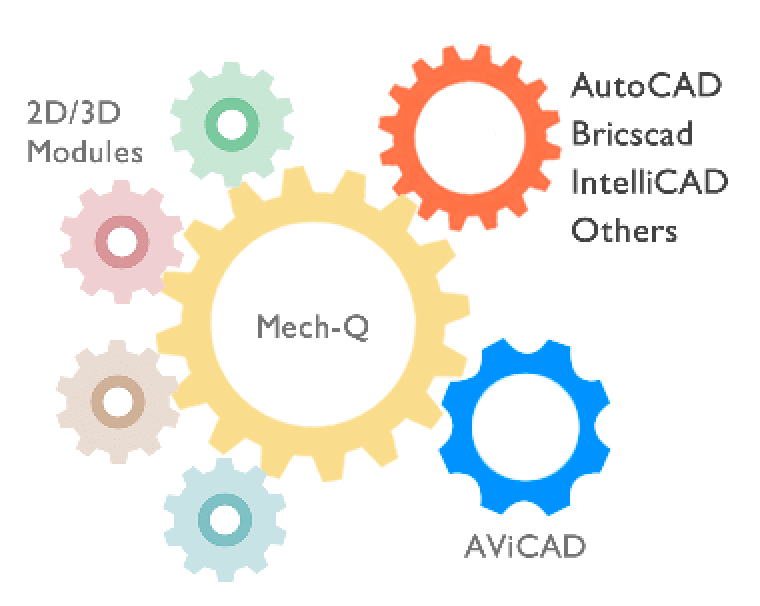
One Toolset. Two Ways to Use It.
Already using CAD?
Mech-Q runs as an add-on inside AutoCAD®, AutoCAD LT®, BricsCAD®, and IntelliCAD-based CAD platforms.
Don’t have CAD?
Mech-Q is fully included with AViCAD, our standalone CAD application. You get AutoCAD-like commands plus the full Mech-Q Suite — all in one package.
Either way, you’re using the same Mech-Q tools.
The Mech-Q Engineering Suite
(Modules shown below — short overview, details further down the page)
The Mech-Q Suite contains four engineering modules
These modules can be purchased separately or as a full suite.
Mech-Q Piping Module

Play Video
Fast, accurate piping without manual drafting
Mech-Q Piping simplifies how piping systems are drawn by letting you define pipe size, material, and routing intent — then placing fittings, valves, and connections automatically. Isometrics, labels, and BOMs are generated as you draw, reducing errors and rework. The result is faster layouts, consistent output, and drawings that are ready for fabrication and construction.
Mech-Q HVAC Ducting Module

Play Video
HVAC layouts that stay clean and consistent
The Ducting module allows you to draw rectangular, round, and flat-oval ducting with automatic transitions, bends, and insulation. Labels and quantities are generated automatically, helping you move from layout to documentation without rebuilding drawings manually. Ideal for engineers who want predictable results without complex setup.
Mech-Q Structural Module

Play Video
Structural steel drawings with weighted BOMs
Mech-Q Structural is built for real-world steel drafting — beams, columns, connections, stairs, ladders, bracing, and frames. Steel shapes are selected from recognized standards, placed in 2D or 3D, and automatically reported in weighted Bills of Materials. Drawings remain standard CAD entities, making collaboration simple.
Mech-Q Mechanical Module

Play Video
Fasteners, gears, shafts, and mechanical components — automated
Mechanical drafting often slows down at the smallest parts. Mech-Q Mechanical removes that friction by automating bolts, fasteners, bearings, gears, shafts, and material-handling components. Instead of hunting libraries or redrawing parts, you choose the specification and place the component instantly — consistently and accurately.
What Makes Mech-Q Different
Traditional CAD tools often focus on commands and how to get the drawing done.
Mech-Q focuses on engineering intent or what you need to draw.
You don’t draw everything from scratch.
You define the part, and Mech-Q draws it correctly every time.
That means:
- Fewer drafting decisions
- Less manual cleanup
- Consistent output across teams
- Built-in reporting as you work
Mech-Q doesn’t replace CAD — it extends it.
What’s Included in Every Module
- 2D and 3D drafting support
- Dialog-driven workflows
- Automatic labeling and annotation
- Live Bill of Materials (BOM) generation
- Fully customizable layers and standards
- Standard CAD objects — easy to share
What You Need & How Mech-Q Is Licensed
Do I need CAD to use Mech-Q?
If you already use a CAD platform such as AutoCAD®, AutoCAD® verticals (Civil, Plant 3D), BricsCAD®, or IntelliCAD-based CAD, Mech-Q runs as a direct add-on. No workflow changes required — it simply extends your existing CAD with engineering automation.
What if I don’t have CAD?
No problem. Mech-Q is fully included with AViCAD, our standalone CAD application. AViCAD provides AutoCAD-like commands, native DWG support, and the complete Mech-Q Suite in one integrated package.
What’s included in the Mech-Q Suite?
The full Mech-Q Suite includes Piping, Structural, HVAC Ducting, and Mechanical modules. All modules support 2D and 3D workflows and generate Bills of Materials (BOMs) automatically as you draw.
Is Mech-Q available for teams or network licensing?
Yes. For multi-user offices, a Mech-Q Network Module is available, allowing centralized license management across your team.
Licensing options
Mech-Q is available as:
Subscription licenses
Ideal for flexibility and short-term or even long-term needs. Updates included while active.
Perpetual licenses (no forced renewals)
One-time purchase. Keep using your version indefinitely — no mandatory renewals.
Optional maintenance is available if you want future upgrades.
AViCAD is also available with subscription or perpetual licensing, giving you flexibility whether you want CAD + Mech-Q together or Mech-Q as an add-on.
For larger offices, a Mech-Q Network Module is also available.
New to Mech-Q?
Mech-Q is designed for engineers and drafters — and created by engineers who’ve spent years doing the same work you do. Most users become productive with Mech-Q very quickly — even without prior experience using engineering add-ons.
Short video tutorials and walkthroughs are available to help you get started with:
- Piping layouts and isometrics
- Structural steel and connections
- Ducting workflows
- Mechanical components and fasteners
For Mech-Q demonstrations, be sure to see our Mech-Q basic series.
Download the Engineering Software Suite!
A free trial is available; no CC is required.