
AViCAD 2027 Preview – New Features, Improvements & Release Information
AViCAD 2027 is available now and introduces one of the largest collections of performance, productivity, and workflow improvements in recent releases.
Built on the new IntelliCAD 14.1 engine, AViCAD 2027 focuses on the things CAD users care about most — faster performance, improved compatibility, enhanced drafting tools, and a smoother overall user experience.
Whether you’re an existing AViCAD user considering an upgrade or evaluating alternatives to expensive CAD subscriptions, AViCAD 2027 delivers meaningful improvements designed to help you work more efficiently.
What’s New in AViCAD 2027?
AViCAD 2027 introduces faster performance, drawing comparison tools, enhanced GIS mapping, improved Raster Draw capabilities, expanded Visual LISP support, floating drawing windows, and optional Flex Licensing.
- Faster Performance
- Improved Productivity
- Better Compatibility
- Easier Everyday Drafting
 AViCAD 2027 is now available. Explore new features including faster performance, drawing comparison tools, enhanced GIS capabilities, improved Visual LISP support, and more. See what's new in AViCAD 2027.
Want a detailed breakdown of every new feature included in AViCAD 2027?
Watch the What’s New AViCAD 2027 Video
The video below highlights many of the major improvements coming in AViCAD 2027, including performance enhancements, drawing comparison tools, GIS improvements, Raster Draw updates, new commands, and licensing flexibility.
AViCAD 2027 Feature Highlights
Faster Performance
AViCAD 2027 delivers significant speed improvements throughout the drafting process. From snapping and regeneration to copy operations and memory management, everyday tasks feel smoother and more responsive.
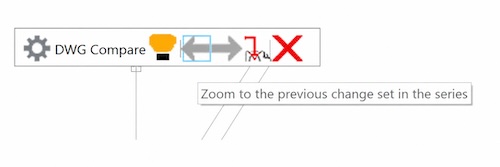
COMPARE Drawing Revisions
Need to know what changed between drawing revisions?
The new COMPARE command automatically highlights additions, deletions, and modified objects, helping reduce the time spent reviewing updated drawings.
Enhanced GIS Mapping
Additional Bing and Esri mapping services provide more ways to work with aerial imagery, street maps, and real-world locations.
Whether you’re working on site plans, utility layouts, or survey projects, AViCAD 2027 makes geographic context easier to access.
Optional Flex Licensing
Need more flexibility for users working from multiple locations?

The new optional Flex Licensing add-on provides a simple and affordable way to share and transfer licenses between users and computers.
- Share Between Users
- Move Licenses Online
- No Network Setup Required
Built for Faster Everyday Drafting
Performance has been a major focus for AViCAD 2027. Many common drafting operations are noticeably faster, particularly when working with larger drawings and more complex projects.
- Faster Snapping
- Faster Regeneration
- Faster Copy Operations
- Improved Memory Management
- Better Overall Responsiveness
The Result
- Smoother Drafting
- Less Waiting
- Better Performance on Large Drawings
AViCAD 2027 is powered by the IntelliCAD 14.1 engine and includes numerous platform improvements designed to improve speed, compatibility, and workflow efficiency.
For users upgrading from earlier releases, AViCAD 2027 represents one of the most significant updates in recent years.
AViCAD 2027 Video FAQ
The following questions relate to features and improvements highlighted in the AViCAD 2027 preview video.
What is the biggest improvement in AViCAD 2027?
While every user works differently, many users will immediately notice the performance improvements included in AViCAD 2027.
Built on the new IntelliCAD 14.1 engine, AViCAD 2027 improves many common drafting operations, including snapping, regeneration, copy operations, memory management, and overall drawing responsiveness.
The result is a smoother drafting experience and less waiting when working on larger or more complex projects.
Learn more about the complete list of enhancements on our AViCAD 2027 Features page.
What is the COMPARE command?
The new COMPARE command helps identify changes between two drawing versions. As discussed on the AViCAD 2027 Features page, COMPARE automatically highlights additions, deletions, and modified objects between revisions, helping reduce the time spent reviewing project updates.
Instead of manually reviewing drawings side by side, AViCAD can automatically highlight added, removed, and modified objects.
When would I use COMPARE?
COMPARE is useful whenever multiple versions of a drawing exist and you need to quickly identify what has changed.
Common examples include:
- Client revisions
- Consultant markups
- Vendor updates
- Project review workflows
What are the GIS improvements in AViCAD 2027?
AViCAD 2027 expands its online mapping capabilities with additional Bing and Esri map services. Users interested in mapping, aerial imagery, and location-based drafting can also review the GIS enhancements covered on the AViCAD 2027 Features page.
These tools allow drawings to be viewed alongside aerial imagery, road maps, and real-world geographic information.
This can be especially useful for:
- Site plans
- Utility layouts
- Land development
- Survey projects
- Infrastructure design
What is the difference between Bing Maps and Esri Maps?
Both services provide geographic mapping information, but each offers different map styles and data sources.
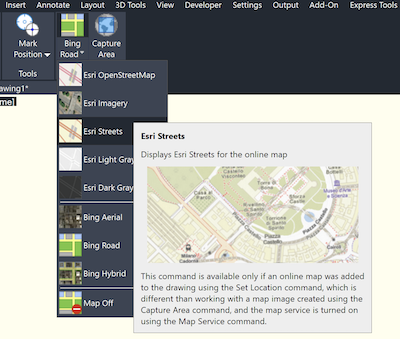
Having access to multiple providers gives users more flexibility when working with real-world locations and project sites.
What Raster Draw improvements are included?
AViCAD 2027 introduces new Raster Draw enhancements designed to make working with scanned drawings and image-based files easier.
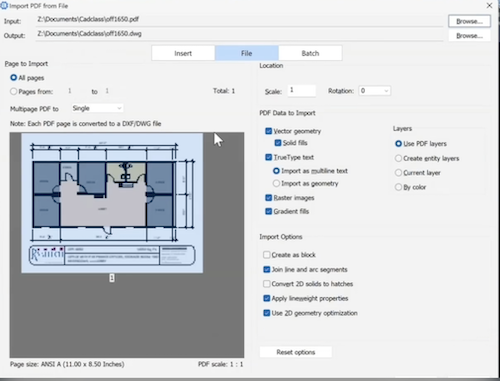
Users can clean up images, correct perspective distortion, and convert raster information into usable CAD geometry. These improvements complement the PDF conversion tools included with AViCAD, making it easier to work with scanned plans and legacy drawings.
This can reduce the need to redraw existing plans and help preserve information from legacy drawings.
Why is raster-to-vector conversion useful?
Many older plans exist only as scanned images or PDFs.
Raster-to-vector conversion helps transform that information into editable CAD geometry, making future modifications significantly easier.
What is the Migration Tool?
Moving to a new CAD version should not require rebuilding your entire workspace.
The new Migration Tool helps transfer settings from previous versions, including:
- Profiles
- Toolbars
- Command aliases
- User preferences
This helps users get up and running more quickly after upgrading.
What are Floating Drawing Windows?
Floating Drawing Windows allow drawings to be detached into separate windows.
This is particularly useful for users working with multiple monitors or comparing drawings side-by-side.
Benefits include:
- Easier drawing comparison
- Improved multi-monitor workflows
- Better access to reference drawings
- More flexible workspace layouts
Does AViCAD 2027 improve PDF and BIM workflows?
Yes.
AViCAD 2027 continues to improve interoperability with PDF and BIM-related workflows.
Enhanced PDF conversion tools convert PDF content into editable CAD geometry, while improved Revit compatibility simplifies communication between CAD and BIM environments.
This makes it easier to exchange information across different design platforms.
See more about AViCAD Compatibility Features
What new commands are included in AViCAD 2027?
AViCAD 2027 introduces several new commands designed to improve drafting productivity and simplify common tasks.
New commands highlighted in the video include:
- ISODRAFT
- SVGIMPORT
- BARCODE
- SHAREWITH
- SURFSCULPT
- MREDO
- BTESTBLOCK
Together, these additions help streamline everyday drafting and reduce repetitive work.
Ready to Learn More?
The preview video only covers a portion of the improvements included in AViCAD 2027.
For a complete breakdown of new commands, workflow enhancements, and platform improvements, visit the AViCAD 2027 Features page.
Additional AViCAD 2027 Questions
Beyond the features covered in the preview video, many users have questions about licensing, Mech-Q, Visual LISP compatibility, upgrade options, and other topics related to AViCAD 2027.
The following questions address some of the most common topics we hear from existing customers and new users evaluating AViCAD.
Are Mech-Q and AEC Still Included in AViCAD 2027?
Yes. AViCAD 2027 continues to include the same integrated Mech-Q Engineering Suite and AEC Architectural tools that users have come to rely on in previous releases.
Mech-Q provides tools for piping, ducting, structural, and mechanical drafting, while the AEC module includes architectural tools to create walls, windows, doors, roofs, stairs, and other building components directly in AViCAD.
Users upgrading from earlier versions can continue using these modules without changing their existing workflows.
What Has Changed for Mech-Q Users?
While the core Mech-Q modules remain familiar, recent releases have introduced several workflow improvements designed to make engineering drafting more efficient.
One of the newest additions is QBOM, a simplified bill of materials workflow that generates bubbles, material tables, and CSV exports from a single interface.
QBOM was designed to streamline material reporting and reduce the complexity of traditional BOM workflows.
Users interested in Mech-Q enhancements can learn more about QBOM and the available engineering modules on the Mech-Q Engineering Tools page.
Have the AEC Architectural Tools Been Improved?
Yes. Recent AEC enhancements provide improved control when placing and modifying architectural elements such as windows and doors.
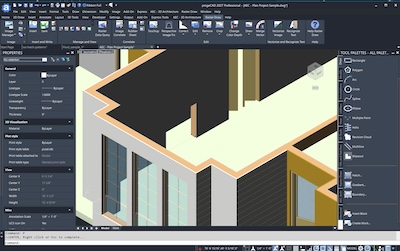
These refinements make it easier to position components accurately and help simplify architectural drafting workflows.
The AViCAD AEC module continues to provide tools for creating walls, windows, doors, roofs, stairs, slabs, and other building components directly inside AViCAD.
Users working with architectural floor plans may also want to explore the full range of architectural tools available within AViCAD.
Does AViCAD 2027 Support Visual LISP?
Yes. One of the major platform enhancements in AViCAD 2027 is expanded support for Visual LISP.
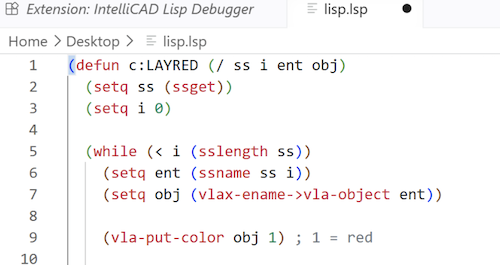
Previous AViCAD releases provided strong AutoLISP compatibility, allowing users to run many existing LISP routines and custom commands. AViCAD 2027 builds on that foundation by adding improved support for Visual LISP features commonly used in AutoCAD® environments.
For many users, this means greater compatibility with existing automation tools, custom applications, and third-party LISP routines.
What is the Difference Between AutoLISP and Visual LISP?
AutoLISP is a scripting language used to automate CAD tasks and create custom commands.
Visual LISP expands those capabilities by adding development tools, debugging, and access to ActiveX and COM automation through functions such as VLA and VLAX.
For users moving from AutoCAD®, improved Visual LISP compatibility can make it easier to reuse existing customization investments.
Why Is Visual LISP Important?
Many engineering firms, architects, and CAD managers have invested years developing custom LISP routines that automate repetitive tasks.
Improved Visual LISP support helps organizations:
- Reduce manual drafting tasks
- Improve compatibility with AutoCAD®-like workflows
- Reuse routines from other CAD platforms
Offices evaluating AViCAD as an alternative CAD platform often consider Visual LISP compatibility an important requirement.
Can AViCAD 2027 Run Existing AutoCAD LISP Routines?
Many AutoLISP and Visual LISP routines can be used directly within AViCAD 2027.
Because custom routines vary considerably, compatibility may depend on the specific functions and APIs being used. However, the expanded Visual LISP support in AViCAD 2027 is designed to improve compatibility with a broader range of existing CAD automation tools.
What is AViCAD Flex Licensing?
AViCAD Flex Licensing is an optional add-on that provides a simple and affordable way to share and transfer licenses between users and computers.
Using cloud-based license transfers, organizations can add licensing flexibility without the complexity of traditional network licensing systems.
Common uses include sharing licenses between team members, moving licenses between office and home computers, and providing occasional access for remote users.
- Share Between Users
- Move Licenses Online
- No Network Setup Required
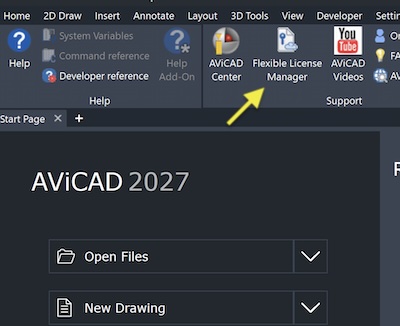
For a complete explanation of how Flex Licensing works, including license transfers, sharing options, and common use cases, visit our dedicated Flex Licensing page.
Is Flex Licensing Included with AViCAD?
No. Flex Licensing is available, but not enabled by default.
The Flex Licensing technology is already built into eligible AViCAD installations, so no additional software is required. Organizations that need the ability to share licenses across multiple users or computers can activate Flex Licensing as an optional upgrade.
For detailed licensing comparisons and examples, visit the AViCAD Flex Licensing page.
Is AViCAD 2027 Right for You?
Whether you’re an existing AViCAD user planning an upgrade, a current subscriber looking forward to the next release, or a CAD professional evaluating alternatives to your current software, AViCAD 2027 delivers meaningful improvements designed to help you work more efficiently.
Built on the new IntelliCAD 14.1 engine, AViCAD 2027 focuses on the areas that matter most to CAD users:
- Improved Compatibility
- Enhanced GIS and Mapping Tools
- Better PDF and Raster Workflows
- Expanded Visual LISP Support
- New Productivity Commands
- Optional Flex Licensing
Perhaps most importantly, these improvements build upon the familiar DWG-based workflow users already know rather than forcing them to learn an entirely new system.
Upgrade with Confidence
Existing AViCAD users can continue working with their current drawings, standards, and workflows.
AViCAD 2027 installs as a separate application, allowing users to evaluate the new version while keeping their existing installation available if desired.
Because AViCAD continues to work directly with native DWG files, existing projects remain unaffected and there is no requirement to convert drawings to a new format.
For many users, upgrading simply means gaining access to additional capabilities while continuing to work the same way they always have.
Looking for an AutoCAD® Alternative?
Many users evaluating AViCAD 2027 are looking for a professional DWG-based CAD platform without the ongoing cost and complexity often associated with traditional CAD subscriptions.
AViCAD provides a familiar drafting environment, native DWG compatibility, integrated engineering and architectural tools, flexible licensing options, and a straightforward migration path for users coming from other CAD systems.
If you’re comparing CAD solutions, AViCAD 2027 may be worth a closer look.
Additional Resources
- AViCAD Product Info
- AViCAD 2027 Features
- Mech-Q Engineering Tools
- AViCAD Version History
- Upgrade Information
- Download Free Trial
- More On Flex Licensing (coming soon)