
Choosing CAD software isn’t just about cost — it’s about stability, compatibility, and whether the tools actually help you get work done faster. AViCAD was built for professionals who want dependable CAD without forced subscriptions, bloated systems, or long learning curves.
Many professionals discover AViCAD after comparing alternatives or researching what modern CAD software should actually deliver. Let’s go over some of what we offer below with AViCAD.
1. Professional CAD at a Fraction of the Cost
AViCAD contains over 90% of the mainstream AutoCAD® commands at less than one-quarter the price. It isn’t a stripped-down tool or a “lite” edition — it’s full-featured CAD software designed for long-term professional use.
Many users first discover AViCAD while searching for an affordable AutoCAD alternative that doesn’t sacrifice DWG compatibility or productivity.
2. Familiar AutoCAD-Style Workflow
AViCAD is intentionally AutoCAD-like. The interface, commands, shortcuts, and workflows feel immediately familiar, allowing most users to become productive in less than a day.
DWG is the native file format — AViCAD opens, edits, and saves DWG files directly, including older DWG versions, without conversion or data loss. For most users, the transition is seamless.
Learn more about AViCAD CAD software.
3. Proven, Stable, and Fast
Released in 2011, AViCAD has been continuously developed for over a decade. It’s built by CAD veterans with decades of experience and is known for stability, speed, and reliability.
Installation is straightforward, performance is responsive even on modest hardware, and updates focus on usability — not unnecessary changes.
4. Mech-Q Engineering Tools Included
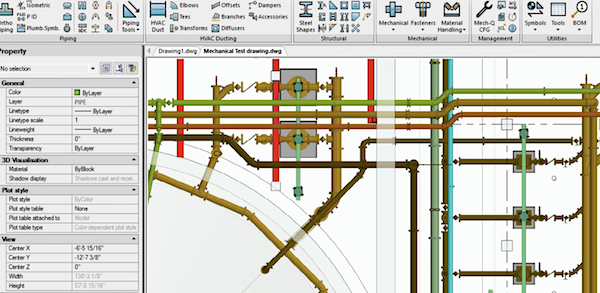
AViCAD includes the full suite of Mech-Q engineering tools at no additional cost. Trusted since the mid-1990s, Mech-Q adds powerful automation for piping, ducting, structural, and mechanical work.
Instead of manually drawing repetitive components, users define sizes and specs — and the software handles placement, annotation, and reporting.
Explore the Mech-Q engineering tools included in AViCAD.
5. Customizable and Extensible
AViCAD supports AutoCAD-compatible LISP and SCRIPT routines, allowing users to customize commands, shortcuts, and workflows.
You can build your own workspace, automate repetitive tasks, and adapt the software to how you already work — not the other way around.
6. Long-Standing Company, Real Support
CADavenue has served customers worldwide since 2009, specializing in engineering add-ons and professional CAD software.
Support is provided by real people you can reach by phone or email — not automated systems. If you get stuck, help is available from people who understand CAD workflows.
7. Built-In Architectural Tools
For users who need architectural drafting, AViCAD includes easy-to-learn tools for drawing walls, doors, and windows. These tools integrate cleanly into standard DWG workflows and don’t lock you into proprietary formats.
8. Extensive Block Libraries
AViCAD includes over 10,000 pre-made blocks to help speed up drawing creation. These blocks are fully editable and can be customized or expanded as needed.
9. Free Training and Learning Resources
AViCAD includes free support and a large library of video tutorials to help users get productive quickly.
Many users report becoming productive within days, helped by familiar commands and guided workflows — see getting started with AViCAD.
10. Free 30-Day Trial — No Risk
AViCAD is available as a fully functional 30-day trial. No credit card is required, and you can test it using your own drawings.
You can download a free 30-day trial and see firsthand how it fits your workflow.
DWG Compatibility You Can Trust
AViCAD’s native file format is DWG. It opens, edits, and saves DWG files from AutoCAD® version 2.5 through the latest formats — without conversion or limitations.
You can review real-world CAD drawings created with AViCAD to see how it performs in actual production environments.
What’s Required?
- Everything is included — except the computer
Recommended system: Intel-class processor, minimum 4 GB RAM (8 GB suggested), and ~5 GB of free disk space. - Windows Compatible
Runs on Windows XP through Windows 11, with full 64-bit support. - Real Help When You Need It
You can reach support by phone or email. Tutorials and videos are available to help you get productive quickly. - Own Your License
AViCAD licenses do not expire. Purchases include free updates within the current major version. You may continue using your version indefinitely or upgrade later — the choice is yours.
What Real Users Say
“After spending years using AutoCAD, I was skeptical about alternatives — until I tried AViCAD. I was blown away by how affordable, easy to use, and functional it is. The Mech-Q tools are far more capable than I expected, and there was virtually no learning curve.”
— Matt Davis, Santee Cooper
“Your support is the best I’ve received. I recommend AViCAD to others regularly.”
— Philip Venton, Venton and Associates Pty Ltd
“I was skeptical because of the low price, but AViCAD and Mech-Q have made shop drawings a breeze. DWGs from architects and engineers import flawlessly.”
— Rick Stone, Stone Heating & Cooling
“As a long-time AutoCAD user, I’m impressed with the power and potential AViCAD provides.”
— Gary Conrad, Integrated Facility Services
“This is one of the easiest and most reliable tools I’ve used to improve CAD productivity. Well worth the investment.”
— Preston Ludek, Cerny MTH Industries
A Smarter Way to Own CAD
Looking for professional CAD software without high monthly subscription fees or forced renewals? AViCAD delivers the tools you need — with licensing options that respect how long you want to use your software.If you’re still comparing options, you can compare AViCAD to AutoCAD across real workflows, compatibility, and long-term cost.